Hi !
I m using the below code for AutoComplete Extender.
Home.aspx
<%@ Page Title="" Language="C#" MasterPageFile="~/Master_Page.Master" ValidateRequest="false" AutoEventWireup="true" CodeBehind="Home.aspx.cs" Inherits="ASK_ME_GURU_3._5.Home_Page" %><%@ Register Assembly="AjaxControlToolkit" Namespace="AjaxControlToolkit" TagPrefix="cc1" %><asp:Content ID="Content1" ContentPlaceHolderID="head" runat="server"><meta name="viewport" content="width=device-width, initial-scale=1.0" /><link href="Content/Styles/Normalize.css" rel="stylesheet" /><link href="Content/Styles/bootstrap.css" rel="stylesheet" /><style type="text/css">
        .auto-style1 {
            margin-top: 0;
        }</style><script type="text/javascript">
        function SetContextKey() {$find('<%=autocomplete1.ClientID%>').set_contextKey($get("<%=ddl_1.ClientID %>").value);
        }</script></asp:Content><asp:Content ID="Content2" ContentPlaceHolderID="ContentPlaceHolder1" runat="server"><form id="form1" runat="server"><div class="input-container" align="center"><div style="margin-left: 197px;"><cc1:ToolkitScriptManager ID="ToolkitScriptManager1" runat="server"></cc1:ToolkitScriptManager><asp:DropDownList ID="ddl_1" runat="server" Style="float: left; height: 35px; border: none; background-color: #1569C7; color: white;"><asp:ListItem Value="0" Text="SELECT" Enabled="true"></asp:ListItem><asp:ListItem Value="KARIMNAGAR" Text="KARIMNAGAR"></asp:ListItem><asp:ListItem Value="WARANGAL" Text="WARANGAL"></asp:ListItem><asp:ListItem Value="KHAMMAM" Text="KHAMMAM"></asp:ListItem></asp:DropDownList></div><br /><br /><br /><asp:TextBox ID="txt_search_1" runat="server" onkeyup="SetContextKey()" Font-Bold="True" Font-Size="Large"></asp:TextBox><div id="listPlacement" style="height: 250px; overflow-y: scroll;"></div><cc1:AutoCompleteExtender ID="autocomplete1" runat="server" TargetControlID="txt_search_1"
                MinimumPrefixLength="1" CompletionInterval="100" ServiceMethod="GetCompletionList"
                UseContextKey="true" ContextKey="<%#Eval(ddl_1.SelectedValue) %>" CompletionSetCount="7"
                FirstRowSelected="false" EnableCaching="true" CompletionListElementID="listPlacement"></cc1:AutoCompleteExtender><asp:Button ID="btn_search" runat="server" Text="Search" CssClass="btn-large" OnClick="btn_search_Click" Style="height: 35px; width: 75px; border: none; background-color: #1569C7; color: white;" /></div></form></asp:Content>
Home.aspx.cs
using System;
using System.Security;
using System.Data;
using System.Linq;
using System.Data.SqlClient;
using System.Configuration;
using System.Collections.Generic;
using System.Web;
using System.Web.UI;
using System.Web.UI.WebControls;
using System.Collections;

[assembly: AllowPartiallyTrustedCallers]

namespace ASK_ME_GURU_3._5
{
    public partial class Home_Page : System.Web.UI.Page
    {

        #region Events

        protected void Page_Load(object sender, EventArgs e)
        {

        }

        protected void btn_search_Click(object sender, EventArgs e)
        {
            Response.Redirect("~/Index.aspx?Category=" + txt_search_1.Text + " &City=" + ddl_1.SelectedValue + "");
        }

        #endregion

        #region Methods
        [System.Web.Script.Services.ScriptMethod()]
        [System.Web.Services.WebMethod]
        public static string[] GetCompletionList(string prefixText,  int count, string contextKey)
        {
            SqlConnection conn = new SqlConnection(ConfigurationManager.ConnectionStrings["connection_string"].ToString());
            {
                using (SqlCommand cmd = new SqlCommand())
                {
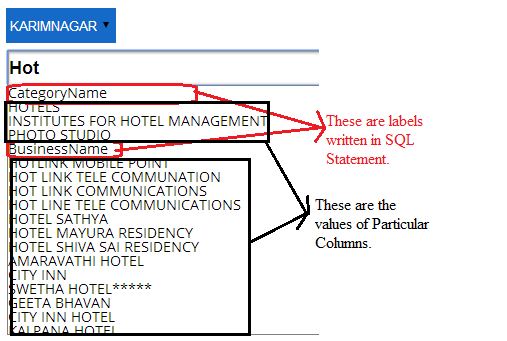
                    string cmdText = "select a.ColumnName from((SELECT 'CategoryName' ColumnName) UNION ALL (Select Distinct CategoryName as columnname from DistrictData where CategoryName like '%'+@Name+'%' and City like @SelectedCity)UNION ALL (SELECT 'BusinessName' ColumnName) UNION ALL  (Select  BusinessName as columnname from DistrictData where (BusinessName like @Name+'%' and City like @SelectedCity))union all (Select  BusinessName as columnname from DistrictData where (CategoryName like @Name+'%'and City like @SelectedCity)))a";
                    cmd.Parameters.AddWithValue("@Name", prefixText);
                    if (contextKey != "0")
                    {
                        cmd.Parameters.AddWithValue("@SelectedCity", contextKey);
                    }
                    cmd.CommandText = cmdText;
                    cmd.Connection = conn;
                    conn.Open();
                    List<string> lstcustomers= new List<string>();
                    string[] customers;
                    using (SqlDataReader sdr = cmd.ExecuteReader())
                    {
                        while (sdr.Read())
                        {
                            lstcustomers.Add(sdr["ColumnName"].ToString());
                        }
                    }
                    conn.Close();
                    customers = lstcustomers.ToArray();
                    return customers;
                }
            }
        }
        #endregion
    }
}
I m getting This View.
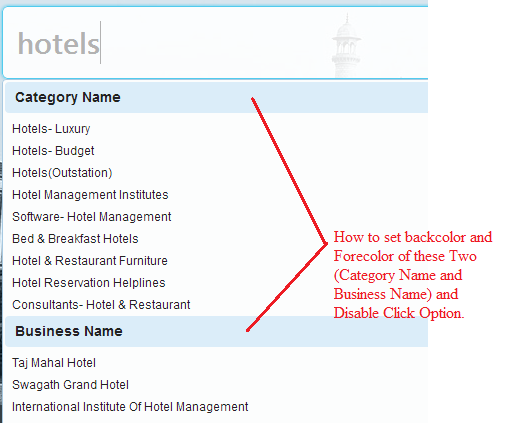
Required something like this.
Thanks in advance !!
Keep Coding !!